InstaSize: AI Photo Editor
- 4.7
- Rating
- 50.00M
- Installs
- Free
- Price

 Analysis by App-foxy
InstaSize: AI Photo Editor is the kind of photography app that makes a strong first impression because it solves several small problems in one place. I can take a photo, adjust its framing, place it in a collage, and give the surrounding space a cleaner look without opening several separate tools. That convenience matters most when I am working quickly rather than trying to produce a carefully polished image from scratch.
After using it as an everyday editing companion, my opinion is more measured. The app is easy to pick up, and its focus on quick visual cleanup makes sense for social posts, family photos, travel snapshots, and simple product images. However, its lasting value depends on whether I regularly need fast layouts and background adjustments. If I only edit one photo every few weeks, a phone’s built-in editor may be enough. If I often prepare several images for sharing, this app has a more convincing place in my routine.
Why the first week feels so useful
The first thing I noticed is that the workflow is built around decisions most people actually make. I am not usually looking for a complicated color-grading session; I want to make a picture fit a particular space, remove awkward empty areas, combine a few moments, or make the background less distracting. InstaSize puts those jobs close together, which reduces the back-and-forth that can make mobile editing feel unnecessarily slow.
You May Also Like

 Blood Strike: 2.5 Anniversary
Blood Strike’s Loadouts Turn Every Drop Into a Tactical Gamble
A close look at Blood Strike’s custom loadouts: how fast access to signature weapons reshapes its battle royale rhythm, rewards preparation, and narrows the gap between fights.

 Pandora - Music & Podcasts
Pandora’s Music Is Easy to Start, but Harder to Recover
Pandora’s strength is its low-effort path from a seed to a station. Its weak spot is how much confidence it asks you to place in connection, setup, and quiet recovery.

 8 Ball Pool
 Is Built on Rivalries, Rematches, and Routine
A close look at the rivalries, rematches, shared routines, and unanswered safety questions that turn a quick pool match into a persistent mobile community.

 Samsung Music
’s Quiet Strength Is Playing What You Already Own
Its reach comes less from spectacle than from dependable access to a personal library. That simplicity is both the app’s strongest retention engine and its ceiling.

 AccuWeather: Weather Radar
AccuWeather Review: A Quick, Clear Forecast for Everyday Decisions
For everyday plans, the best forecast is the one you can understand quickly. AccuWeather makes rain timing, radar, and local conditions easy to act on, with a few trade-offs.

 Hill Climb Racing
Why Hill Climb Racing Still Turns Crashes Into One More Run
A tiny car, a bumpy hill and one more upgrade: Hill Climb Racing keeps resurfacing because its simple chaos makes every near-miss feel personal.
More From Our News Desk
View All News


Its main appeal is not that it replaces every serious photo tool. Instead, it acts as a practical middle layer between the original camera image and the finished post. I can begin with an ordinary picture and make it more presentable without needing to understand advanced editing terminology. That makes the app approachable for someone who finds professional editors intimidating but still wants more control than the default gallery provides.
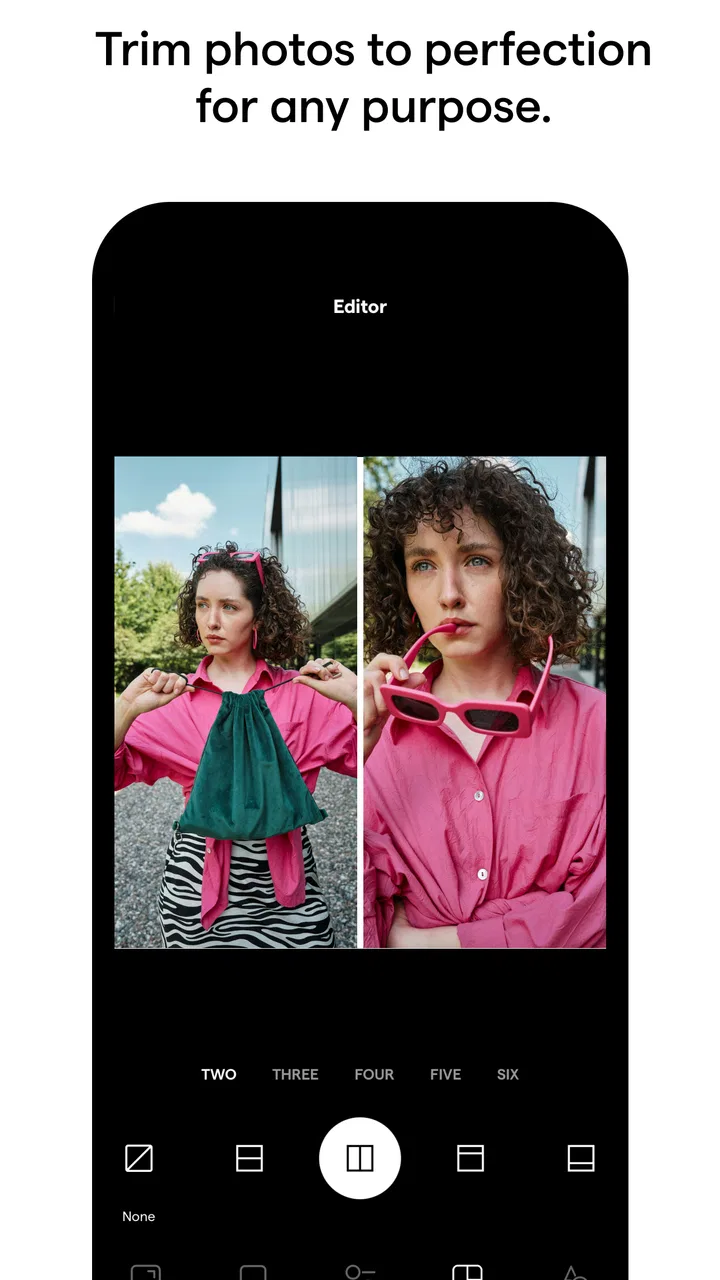
The collage workflow is particularly useful when a single image does not tell the whole story. For a weekend outing, I might combine a wide view, a close-up detail, and a candid shot into one compact composition. That is more efficient than posting several separate images when I simply want to share a quick visual summary. The important trick is to choose photos with different roles rather than three nearly identical frames; the result feels intentional instead of crowded.
Cropping is another feature that earns its place early. A photo often looks fine in the camera roll but loses its subject when placed into a square or portrait-oriented space. I found it better to crop before adding decorative treatment, because deciding on the subject’s position first prevents the background work from being wasted. Keeping a face, sign, or main object away from the edge also gives the final image more breathing room.
The background tools are helpful when the original framing leaves an unattractive edge or when I want a more consistent look across a small set of images. They are especially handy for casual announcements, menu-style photos, and simple before-and-after layouts. I would not treat them as a substitute for careful retouching, but they can turn an awkward composition into something that looks deliberately arranged.
There is also a psychological benefit during the first few sessions: the app lowers the cost of experimenting. I am more willing to try a collage or a different crop when I know I can undo the decision and continue refining the same image. That makes it easier to discover a personal style, even if the final result is modest rather than dramatic.
A realistic everyday workflow
Imagine I have taken photos at a friend’s birthday and want to send one image to a group chat that captures the cake, the table, and the people. I would select the strongest frames, remove duplicates, and build a collage with one dominant image and smaller supporting pictures. I would then crop each frame so the important details remain visible, check whether the surrounding background distracts from the subjects, and save the finished composition.
That process is more useful than applying a filter automatically and calling the job finished. The best results come from editing with a purpose: deciding what the viewer should notice first, what can be omitted, and whether the images belong together. InstaSize helps with those practical steps, but it does not make those choices for me in a meaningful way. I still need to judge spacing, balance, and whether the collage has too much going on.
For a small online seller, the same workflow can be adapted to product photos. I could combine a full view with a detail shot, crop both consistently, and use a restrained background treatment so the item remains the focus. The app is more suitable for quick catalog-style presentation than for high-end commercial photography, but it can save time when the goal is clarity rather than perfect studio control.
What changes after the novelty fades
During the first week, the range of quick fixes can feel fresh. I may try several layouts simply because they are available, and the ability to reshape a photo encourages experimentation. After that initial period, the question becomes whether I have recurring tasks that justify keeping the app installed. In my experience, the answer is yes for people who regularly create collages or need images to fit different spaces, but less clearly for occasional photographers.
The app becomes more valuable when it is attached to a repeatable habit. For example, I could use the same general editing order for every travel album: select, crop, arrange, inspect the background, and export. A consistent sequence reduces indecision and keeps me from spending too long on minor details. The lasting benefit is therefore less about discovering new effects and more about making a familiar job quicker.
I also found that restraint improves the results. A collage does not need every memorable photo, and a background adjustment should support the subject rather than compete with it. When I limit a layout to a few images and keep the visual treatment consistent, the app feels like a useful design tool. When I keep adding elements because I can, the result becomes busy and the convenience starts working against me.
That distinction is important for anyone deciding whether the app deserves permanent space. Its strongest recurring use is functional editing, not endless browsing for novelty. If I want a new visual style every day, I may eventually feel that the experience is repetitive. If I want a dependable way to prepare images for sharing, the simpler approach holds up better over time.
Where it fits among familiar alternatives
A phone’s built-in photo editor remains the quickest choice for basic brightness, rotation, and simple cropping. I would not open InstaSize merely to straighten a picture or make a small exposure adjustment. The extra value appears when the task involves multiple images, a designed layout, or a background that needs more attention than a standard gallery tool usually provides.
Dedicated design platforms can be better when I need precise typography, layered compositions, brand controls, or detailed alignment. They are often preferable for posters, formal promotional material, and projects that must be repeated with strict consistency. InstaSize feels lighter and faster for informal visual work, but that lighter approach also means I should not expect the same depth as a full design workspace.
Professional photo editors are the stronger choice for raw-image control, selective corrections, detailed masking, and color decisions that need to remain consistent across a serious project. InstaSize is not where I would finish a demanding portrait series or prepare a print that depends on exact tonal control. Its advantage is speed and accessibility, not exhaustive precision.
There is also a difference between using a template-based social tool and using this app as a flexible photo utility. Templates can make a post look finished with very little thought, but they may push the image toward a recognizable style. InstaSize is more useful when I want to make my own decisions about cropping, grouping, and the amount of visual decoration. That freedom is valuable, although it places more responsibility on me to avoid clutter.
Small decisions that improve the results
One useful habit is to make a clean copy of the original before experimenting. I prefer to preserve the uncropped photo and treat every exported version as a separate outcome. This matters when I later discover that a tight crop worked for one use but removed too much context for another. A quick editor is most helpful when it does not encourage me to lose the flexible original.
Another practical tip is to design for the destination before editing. A collage intended for a message should be readable at a glance, while one intended for a profile or feed may need a different balance of empty space. I first decide how the image will be viewed, then crop around that purpose. This prevents the common mistake of making a beautiful arrangement that becomes difficult to understand once it is displayed small.
I also recommend checking the edges of every frame before saving. Important details near a border can disappear after cropping, and a collage may make that problem less obvious until the final review. I zoom in on faces, text, and product labels, then inspect the complete composition at a smaller size. That second view often reveals spacing problems that are easy to miss while concentrating on one photo.
For consistent albums, I would choose a simple visual rule and repeat it. Similar crop proportions, comparable background treatment, or a shared order of images can make separate edits feel connected. The app can support that discipline, but it does not automatically guarantee it. Consistency comes from my choices, and that is one reason the tool remains useful beyond the first few playful sessions.
What may create fatigue
The main source of fatigue is not difficulty; it is the possibility of too many small choices. When I only need one quick image, selecting a layout, adjusting a crop, and reconsidering the background can take longer than expected. The app is most satisfying when the task genuinely benefits from those options. For a single ordinary snapshot, the extra steps may feel like unnecessary maintenance.
Another limitation is that quick visual improvement can tempt me to over-edit. A background that looks helpful in isolation may distract from the subject once the full composition is viewed. Collages can also become repetitive if every event is presented with the same arrangement. I get better long-term results by treating the app as a problem-solving tool rather than a reason to decorate every photo.
In-app purchases are present, with individual items ranging from under a dollar to the mid-thirties. The free entry point makes it easy to test the core workflow, but I would pay attention before adopting any paid options as part of a regular process. Occasional users may prefer to stay within the free experience, while frequent creators should decide whether the added tools genuinely save time rather than simply adding more choices.
The app is free to download, which lowers the risk of trying it, and it is suitable for Everyone. It has been available since late 2012, so it is not a brand-new experiment competing only on novelty. The developer, Instasize, Inc., has kept the product positioned around accessible mobile photography, and the current version is 5.6.4. On Android, it requires at least version 6.0 of the operating system.
Its broad adoption is easy to understand: it has passed fifty million installs and holds a 4.7 average from roughly one-point-one million ratings, alongside about twenty-seven thousand written reviews. Those figures do not replace personal testing, but they do suggest that the basic combination of quick editing, collages, and framing tools has remained relevant to a large audience.
Who should keep it installed
I would recommend it to someone who frequently prepares photos for social sharing but does not want to learn a complex design program. It is also a good fit for parents making compact family updates, travelers assembling trip highlights, and small sellers who need clean, readable image combinations without building a full brand system.
It is less suitable for photographers who care about advanced color management, detailed retouching, or exact control over every layer. I would also suggest skipping it if I only need occasional basic edits and already feel comfortable with the editor included on my phone. In that situation, adding another app may create more clutter than value.
People who dislike subscription-style ecosystems or optional purchases should explore the free workflow carefully before committing to a particular editing routine. The app can be useful without turning every image into a project, but its long-term fit depends on whether its paid possibilities feel like meaningful upgrades rather than distractions.
Does it earn lasting space?
My long-term verdict is positive, with a clear condition: InstaSize earns its place when I use it for repeatable visual tasks. Its strongest qualities are the quick transition from a raw phone photo to a shareable composition, the practical combination of cropping and collages, and the ability to improve backgrounds without moving into a full professional editor.
It does not permanently solve every photography need, and I would not keep it open out of habit alone. The app can become tiring when I use it for edits that a built-in gallery tool handles faster, or when I chase decorative changes without a clear purpose. It also cannot replace a serious design or retouching workflow when precision matters more than convenience.
For me, the best maintenance strategy is simple: keep the original, edit with the final viewing context in mind, inspect the edges, and save only versions that serve a real purpose. Used that way, the app remains a dependable shortcut rather than a novelty box. Its lasting value comes from reducing repeated editing friction, not from offering endless reasons to tinker.
In short, I would tell a friend to try it if collages, crops, and background cleanup appear regularly in their photo routine. I would not recommend installing it solely because it promises a more exciting editing experience. The first week is enjoyable, but the real test is the next month: if it helps you finish the same everyday image tasks with less effort, InstaSize: AI Photo Editor has earned a useful, durable spot.
FAQs for InstaSize: AI Photo Editor
01What is InstaSize: AI Photo Editor used for?
InstaSize: AI Photo Editor is designed for editing and preparing photos and videos for social media. It includes resizing tools, filters, effects, borders, retouching features, collage layouts, text options, and AI-powered editing functions. During testing, it felt especially useful for quickly adapting images to different platform formats without manually cropping important parts of the picture.
02Is InstaSize: AI Photo Editor free to download and use?
The app can generally be downloaded for free, but not every feature is available without restrictions. Some premium filters, effects, editing tools, templates, or AI functions may require a subscription or in-app purchase. Before confirming a trial or subscription, check the current pricing, renewal terms, and whether the free version includes advertising or export limitations.
03Does InstaSize reduce photo quality when saving or sharing images?
InstaSize is built to resize and export content for social networks, so it normally preserves a good level of visual quality for everyday sharing. However, the final result can depend on the original file, selected export settings, and the platform where the image is posted. Users who need professional-quality files should review the available resolution options before saving.
04Does InstaSize include AI editing tools, and are they easy to use?
The app includes AI-oriented features intended to simplify tasks such as enhancing images, applying creative effects, improving portraits, or generating polished edits with limited manual work. These tools are convenient for beginners because they usually require only a few taps. Results can vary depending on the photo, so users should preview the final image carefully before exporting.
05Is InstaSize safe for editing personal photos and videos?
InstaSize is suitable for common photo and video editing, but users should still review its privacy policy and permission requests before using it. Editing may involve access to the device gallery, camera, or online services, particularly when AI features process content. Avoid uploading highly sensitive images unless you understand how the app handles, stores, and deletes user data.
Pros
- Quickly resizes photos for Instagram and other social platforms.
- Includes attractive filters
- frames
- stickers
- and creative effects.
- AI tools can enhance images with minimal editing experience.
- Supports collages and simple layouts for multiple photos.
- Easy-to-use interface makes basic edits fast and accessible.
Cons
- Many premium effects and tools require a paid subscription.
- Exported images may include quality limits on some editing options.
- AI results can look inconsistent with complex or low-quality photos.
- Frequent promotional prompts may interrupt the editing workflow.
- Some features require an internet connection to process content.

InstaSize: AI Photo Editor
Gallery